Newsletter & contact form
Akira includes two sections for collecting information from visitors: Newsletter, a simple email signup with a background image, and Contact form, a fully block-driven form builder that can be configured for far more than a basic contact form.

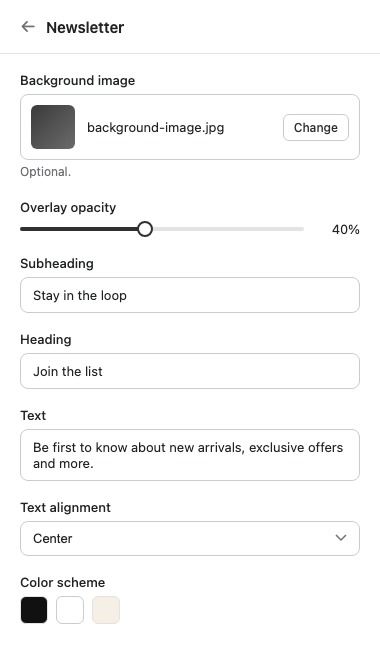
Newsletter
Newsletter is an email signup section with an optional background image, meant for building your subscriber list on the homepage or a landing page.
| Setting | What it does |
|---|---|
| Background image | Optional image shown behind the signup form. |
| Overlay opacity | Darkens the background image so text stays readable. |
| Subheading | Supporting text shown above the heading. |
| Heading | Main heading for the section. |
| Text | Rich text shown under the heading. |
| Text alignment | Aligns the heading and text left, center, or right. |
| Color scheme | Sets the section's colors from your theme's color schemes. |
| Top padding / Bottom padding | Spacing above and below the section, in pixels. |
Contact form
Contact form is a block-driven form builder. Instead of a fixed set of fields, every field in the form is its own block, so you choose exactly which fields appear and in what order.
| Setting | What it does |
|---|---|
| Subheading | Supporting text shown above the heading. |
| Heading | Main heading for the section. |
| Text | Rich text shown above the form. |
| Show phone field | Adds a phone number field to the form. |
| Color scheme | Sets the section's colors from your theme's color schemes. |
| Top padding / Bottom padding | Spacing above and below the section, in pixels. |
Build the rest of the form from these field blocks, added in any combination and order:
- Text field – a single-line text input.
- Email field – a single-line input validated as an email address.
- Number field – a single-line input that only accepts numbers.
- Text area – a multi-line text input, useful for a message or comments field.
- Dropdown – a select list of options.
- Radio buttons – a single choice from a set of options.
- Date picker – a date input.
- Checkbox – a single yes/no toggle, useful for consent or opt-in confirmations.
Because every field is its own block, Contact form isn't limited to a basic name/email/message form. Add a Dropdown for an inquiry type, a Date picker for a preferred appointment, or a Checkbox for terms agreement, and build the exact form your store needs.
Tip: Order your field blocks the way you'd want a person to answer them out loud. A form that jumps between topics feels harder to fill in, even if every individual field is simple.