Miko Product Rentals
Live on Shopify App Store

Add rental booking to your
Shopify store in minutes

Customers pick their dates, you manage availability, deposits, and returns from one dashboard. No coding. No workarounds. Genuinely free to start.

Install Free on Shopify See Full Feature Page ↗

Free plan available – 10 lifetime rentals, no credit card required.

Miko Product Rentals app showing booking calendar and rental management dashboard
Built For

Any Shopify merchant who rents products

From outdoor gear to photography equipment, costume hire to event furniture. Miko handles the booking side so you can focus on your customers.

Outdoor and Sports Gear

Kayaks, bikes, surf gear, camping equipment

Photography and AV Equipment

Cameras, lenses, lighting rigs, audio gear

Costumes and Formal Wear

Costumes, suits, gowns, accessories

Furniture and Event Props

Staging, event furniture, art installations

Tools and Equipment

Power tools, construction, specialist machinery

Event Supplies

Marquees, sound systems, catering equipment

Core Features

Everything your rental business needs

A complete rental layer on top of your existing Shopify store. No separate system. No spreadsheets.

Rental Date Picker

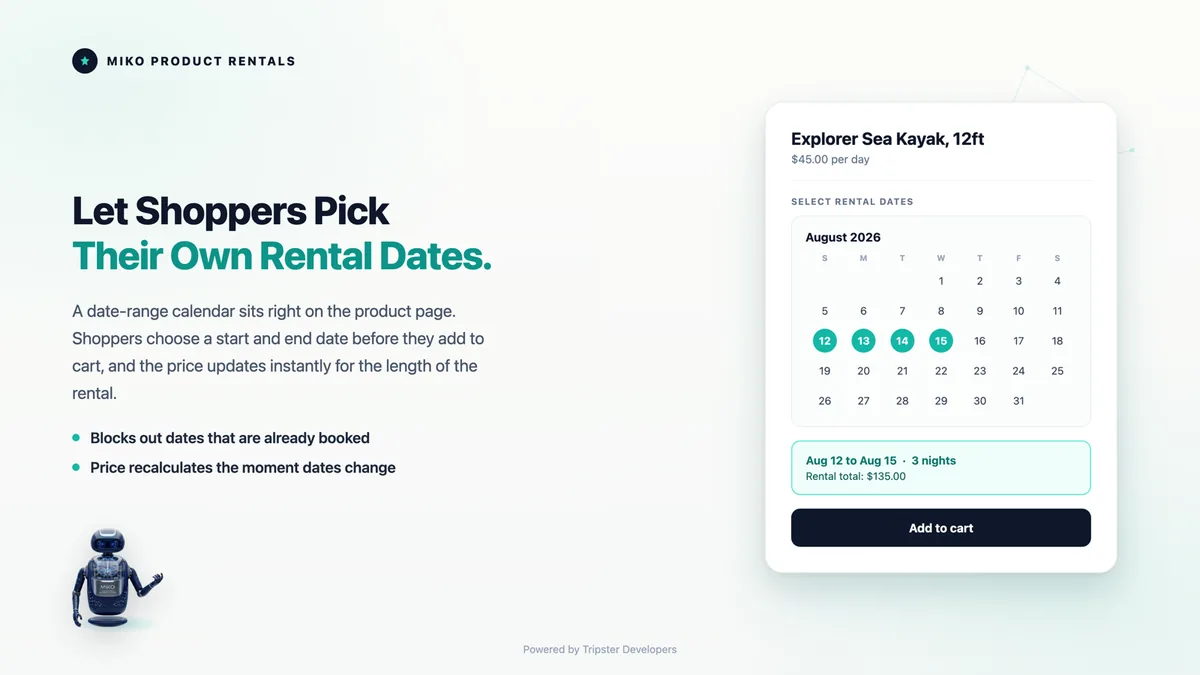
A native booking calendar on your product pages. Customers pick dates and see live availability before adding to cart. No code editing required.

Multi-Unit Inventory

Set unit counts per product or variant. Miko tracks bookings so customers can never double-book. Each variant gets its own inventory pool.

Flexible Pricing

Set daily, weekly, and monthly rates. Miko calculates the best rate automatically based on the customer's chosen duration.

Deposit Management

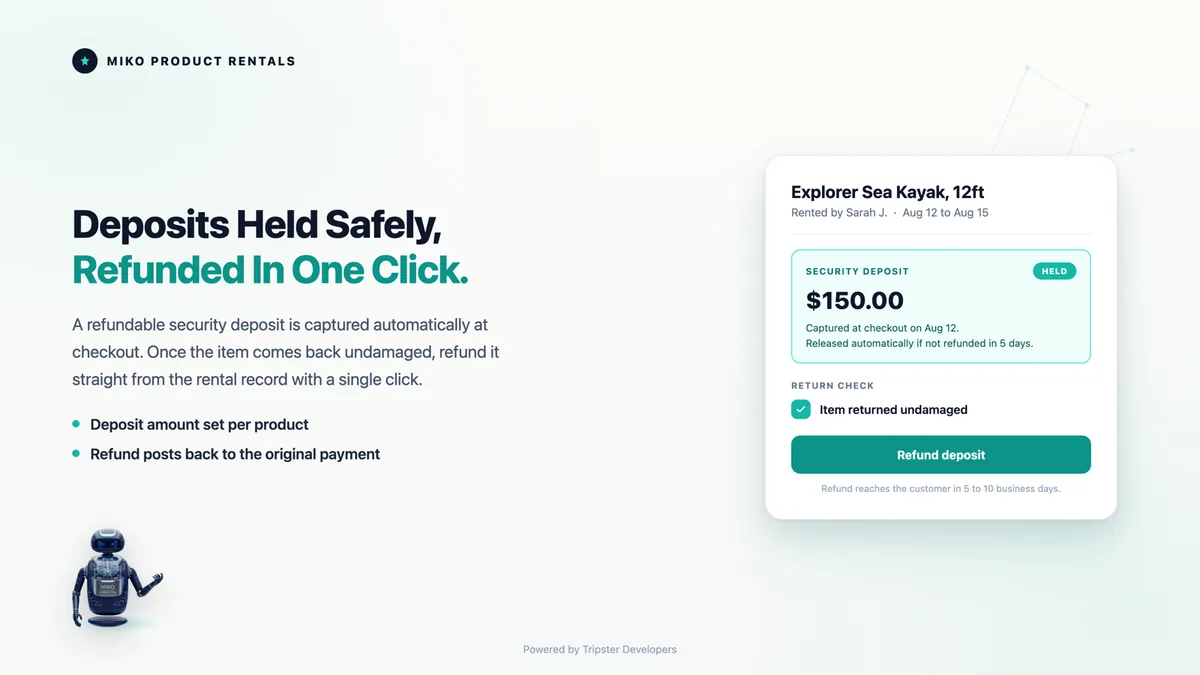
Charge a deposit at checkout. Release it on return or forfeit if there's damage. One-click from your dashboard.

Automated Emails

Booking confirmation, return reminders, and overdue notices sent automatically. Fully branded templates. BYO SMTP on Starter and above.

Late Fee Tracking

Configure a grace period and daily late fee. Miko flags overdue bookings automatically and calculates the amount owed.

Blocked Dates

Block specific dates per product or store-wide. Useful for maintenance, closed periods, or public holidays.

Booking Management

Every rental has a clear lifecycle: pending, confirmed, active, returned, overdue, cancelled. Full visibility from one screen.

Rental Analytics

See booking activity, inventory utilisation, and top-rented products at a glance. All inside Shopify admin.

How It Works

Up and running in under 10 minutes

No developer. No theme customisation. No migration from another system.

1

Install and select rental products

Install Miko Product Rentals from the Shopify App Store. Select the products you want to rent out and configure unit counts, pricing, and any minimum rental duration.

2

Add the date picker to product pages

Enable the Miko Rentals block in your Shopify theme editor. Drag it onto your product page template. Customers immediately see an availability calendar and can select their rental dates.

3

Manage bookings from your dashboard

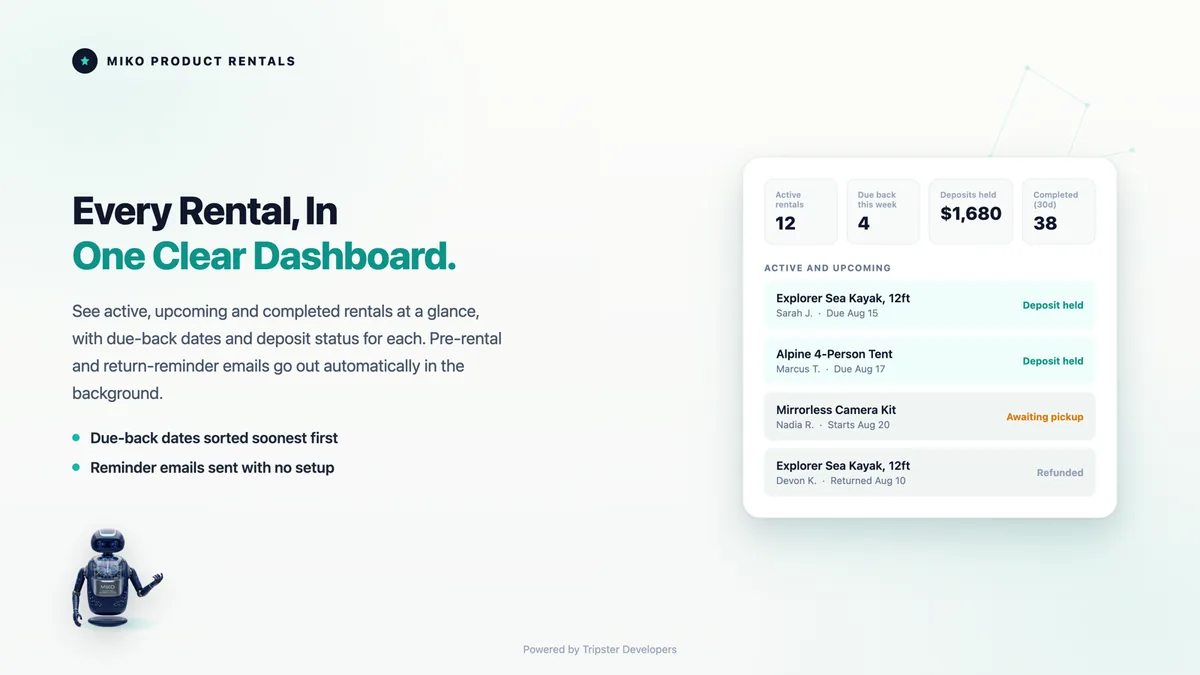
Every booking lands in your Miko dashboard with customer details, rental dates, deposit status, and booking history. Mark items returned, release deposits, and send emails from one place.

App Screenshots

Designed for how rental businesses actually work

A date picker your customers will actually use

The rental calendar loads directly on your product page via a Theme App Extension. Unavailable dates are blocked automatically. Customers see real availability, not a guess.

  • Live availability from real inventory counts
  • Minimum and maximum rental duration rules
  • Works on any Shopify theme, no code required
  • Mobile-first and fully responsive
Miko Product Rentals date picker on a Shopify product page

Every rental in one clean dashboard

Your booking dashboard gives you full visibility across all products. Filter by status, search by customer, and drill into any booking for complete details. All inside Shopify admin.

  • Booking status across all lifecycle stages
  • Customer details and deposit status
  • Internal notes per booking
  • One-click actions: confirm, return, forfeit deposit
Miko Product Rentals booking management dashboard

Deposits collected and tracked automatically

Set a deposit amount per product and Miko handles the rest. Collected at checkout, released or forfeited on return. Full audit trail of every deposit action.

  • Deposit collected at checkout alongside rental fee
  • One-click release or forfeit on return
  • Full history of deposit actions per booking
Miko Product Rentals deposit management controls
Pricing

Start free. Scale when you are ready.

Every plan includes the full feature set. The free plan is genuinely free with no time limit.

Free

$0

10 lifetime rentals

  • 10 total rentals (lifetime, not monthly)
  • Full rental date picker
  • Multi-unit inventory management
  • Deposit collection and management
  • Booking dashboard and calendar
  • Blocked dates per product
Get Started Free

Starter

$19.95/month

50 rentals per month

  • 50 rentals per calendar month
  • Everything in Free
  • Automated email notifications
  • Customisable email templates
  • Remove Miko branding from widget
  • BYO SMTP (send from your domain)
Start Starter

Pro

$89.95/month

500 rentals per month

  • 500 rentals per calendar month
  • Everything in Growth
  • Insurance and damage protection (coming soon)
  • Priority support
Start Pro
FAQ

Common questions

Yes. It works on every Shopify plan including Basic, Shopify, Advanced, and Plus. No Shopify Plus subscription is required.

Genuinely free. You get 10 lifetime rentals at no cost with no credit card required. It is a real starting point, not a 14-day countdown.

Via a Shopify Theme App Extension. You drag the Miko Rentals block onto your product page template in the theme editor. No code editing, no theme file changes.

Yes. Each variant gets its own unit count, pricing, and availability calendar. A kayak store can set up Small, Medium, and Large kayaks with separate inventory pools and different daily rates.

The deposit is added to the checkout total alongside the rental price. When the item is returned safely, you release the deposit via Shopify's refund system with one click. If there is damage, you forfeit it instead.

Miko automatically updates the booking status to overdue and sends an overdue notice (Starter and above). You configure the grace period and daily late fee amount in your settings.

No. Miko Product Rentals uses a Theme App Extension, which means you add the date picker block through the Shopify theme editor without touching any theme code directly.

Ready to start renting on Shopify?

Free plan available. No credit card required. Up and running in under 10 minutes.

Install Free on Shopify ↗

Built in New Zealand by Tripster Developers · Shopify Plus Partner