
Know what to reorder, and when
Reorder guidance from your own sales history, with low-stock alerts and a weekly digest.
 Miko Restock: Inventory & POLive on the Shopify App Store
Miko Restock: Inventory & PO is the seventh app in our own Shopify suite, designed and written here in Auckland. This is the build note: where the brief came from, which parts were genuinely difficult, and what solving them says about the work we can do inside your store.
Plans, screens and settings live on the Miko product page. There is a free plan, and Pro is $15 a month with a 7-day free trial.
 Miko Restock: Inventory & PO
Why merchants install it
Reorder guidance from your own sales history, with low-stock alerts and a weekly digest.

Raise purchase orders from what you need; on Pro, email them straight to suppliers.

Reports show the stock that is not selling, so you can clear it before you buy more.
How it works
Add Restock from the Shopify App Store and import history from another tool if you have it.
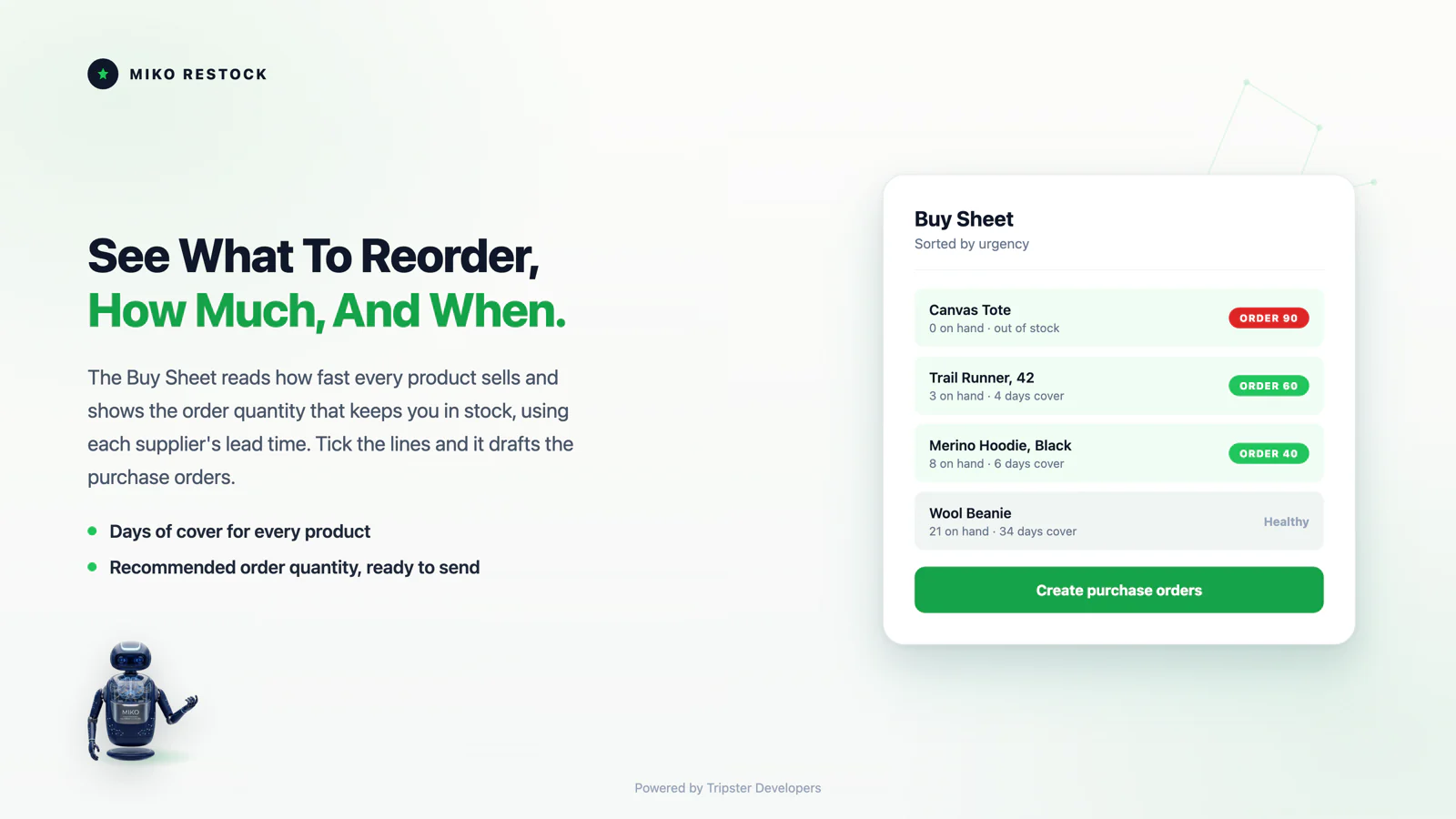
Restock reads your sales history and shows what to buy and when.
Raise purchase orders and run quick stock counts with CSV export.
Pricing
$0
$15/month
Pro includes a 7-day free trial. Prices in USD, billed through Shopify.
The build story
01The Brief
Two things kept turning up in the stores we work on. The first is that reorder decisions were being made in a spreadsheet next to the Shopify tab, rebuilt by hand every week, and quietly wrong the moment a supplier changed how long they take. The second is that Shopify's own Stocky is being switched off on 31 August 2026, and the merchants relying on it were about to lose years of purchase order history with no bulk way to take it with them.
We could have written a one-off script for each store. Instead we built the thing once, properly, as an app we operate ourselves, so the same problem never has to be re-solved per client. That is the argument this page is really making: what we ship for ourselves is what we are prepared to ship for you.
02The Hard Parts
None of these are visible in a feature list. All four are the reason the app behaves under a real catalog rather than a demo one.
03What This Proves
If your operations run on a spreadsheet, a legacy tool that is being retired, or an ERP that disagrees with Shopify about stock, the work is the shape above. Modeling a merchant's data so a screen answers instantly, making a calculation defensible enough that a business will act on it, guarding every write with a preview, and moving history off a platform that is closing. We have those four in production, under load, with our own name on the support inbox.
Full detail, every screen and the plans are on the Miko Restock product page, and the merchant guide is at miko.co.nz/docs/restock/.
04From The Build
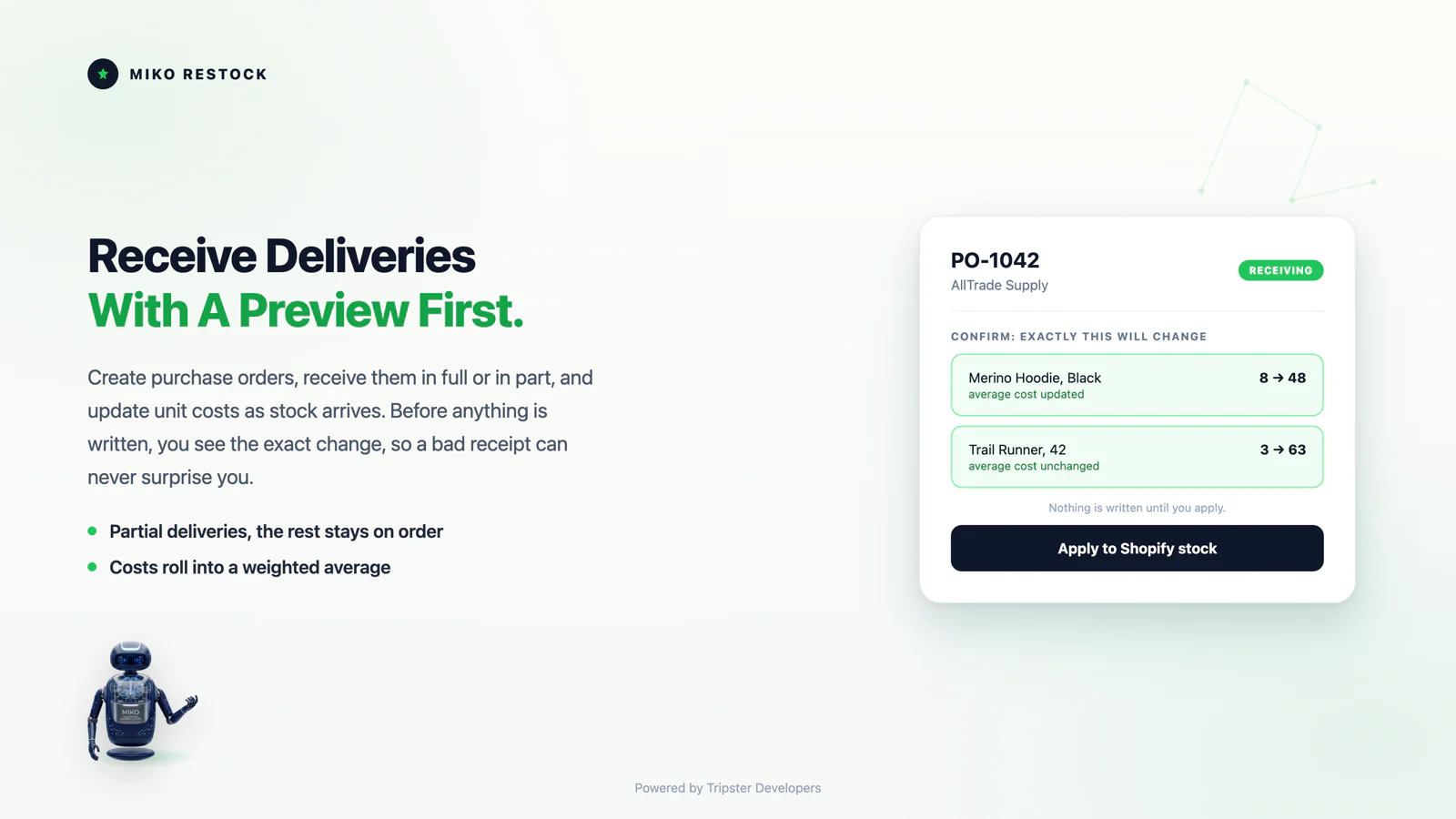
Interface work on an operations tool is mostly about ranking and consequence. What needs attention first, and what is about to change.
FAQ
Tripster Developers, a Shopify agency in Auckland, New Zealand. We wrote the forecasting maths, the purchase order and stocktake flows, the migration importer and the Shopify GraphQL sync layer, and we run the app in production ourselves.
On the product page at miko.co.nz/restock, which carries every screen, setting and report, plus the plans. This page is the build note that sits behind it.
Yes. It is live on the Shopify App Store with a free plan available. The merchant guide walks through the Buy Sheet, purchase orders and stocktakes end to end.
Yes. The parts that made this app work are the parts most operational builds need: a resumable catalog sync, forecasting a merchant can check by hand, a single guarded path for every write back to Shopify, and an importer that gets historic data out of a system being switched off. Start at Shopify app development.
Yes. Custom themes, Shopify Plus builds, ERP and middleware integrations, and private apps for merchants who need something the App Store does not sell. Our own suite is where the patterns are proven first.
Because inventory is money and a silent write is how trust dies. Receiving a purchase order or applying a stocktake shows the exact stock and cost change first, and nothing moves until the merchant approves it. That single rule shaped the whole write path.
Order dates and quantities only, never customer names or addresses. Forecasting does not need to know who bought something, only when and how much, so the app simply never requests the sensitive scopes.
Lead times are a property of the supplier, set once, and every recommended order quantity and date is computed around them. A three-week supplier triggers an earlier order than a next-day one, automatically.
The app exposes its inventory answers to Sidekick, so a merchant can ask what is low and what to reorder in plain language and get the same numbers the Buy Sheet shows. Building for Sidekick is part of every Miko app rather than an afterthought.
Writing stock safely. Reports are easy; a system that changes inventory has to be safe to run twice, previewable before any write, and able to receive a purchase order in part without corrupting the cost history. Most of the engineering time went there rather than into the forecasting maths.
Continuously. Shopify deprecates API versions on a schedule, and the app is updated ahead of it, alongside merchant-requested features. Being a smaller team means a well-argued request can genuinely ship.
Yes. The forecasting, purchase order and stocktake machinery does not depend on being an App Store listing. For merchants with unusual operations we build the same capabilities as a private app, to the same standard, scoped to their catalog.
A focused app with a defined scope is typically 8 to 16 weeks to a first public release. Inventory work sits at the longer end because writes carry real money and the receive and stocktake edge cases cannot ship half-done.
The App Store is a forcing function. It holds every release to Shopify's bar for OAuth, webhooks, billing and privacy, and running our own apps in production means client work is built by people who operate the same class of system.
Full merchant documentation lives at miko.co.nz/docs/restock/, covering the Buy Sheet, purchase orders and stocktakes end to end. It is written from the actual behavior of the app rather than a marketing summary.
The problem, not a spec: what you sell, where stock lives, what goes wrong today and what it costs when it does. You get a written response with an honest read on scope, a fixed-price range and a timeline.
Built by
Miko Restock: Inventory & PO is built and maintained by Tripster Developers, a Shopify Partner working on Shopify and Shopify Plus since 2016, from Auckland, New Zealand. Restock is the seventh app in the Miko suite, built for merchants whose stock decisions were being made in a spreadsheet.
We build the same way for clients: custom Shopify themes, Shopify Plus builds, ERP and middleware integrations, and private apps for merchants who need something the App Store does not sell.
Free plan with 20 purchase orders a month. 7-day free trial on Pro. Pro is one plan at $15 a month.
Install free on ShopifyTell us where the spreadsheet is, and we will tell you what it would take to remove it.
More apps we build and run
Every Miko app is built to the same App Store standard and maintained by the developers you would talk to on a project.
 Miko Loyalty & Rewards
Points, VIP tiers and referrals that bring shoppers back.
Miko Loyalty & Rewards
Points, VIP tiers and referrals that bring shoppers back.
 Miko B2B Wholesale Pricing
Wholesale prices by customer tag, NET terms and POs.
Miko B2B Wholesale Pricing
Wholesale prices by customer tag, NET terms and POs.
 Miko Claude AI
Churn prediction, RFM segments and AI win-backs.
Miko Claude AI
Churn prediction, RFM segments and AI win-backs.
 AI Descriptions & Narrate
Bulk SEO copy in your voice, plus a Listen button.
AI Descriptions & Narrate
Bulk SEO copy in your voice, plus a Listen button.
 Miko Product Rentals
Date pickers, deposits and overbooking protection.
Miko Product Rentals
Date pickers, deposits and overbooking protection.
 Miko Subscribe & Save
Subscriptions and subscribe & save with a self-serve portal.
Miko Subscribe & Save
Subscriptions and subscribe & save with a self-serve portal.
 Miko Bulk Image Resizer
Resize, compress and watermark every product photo.
Miko Bulk Image Resizer
Resize, compress and watermark every product photo.
 Authentica: COA Certificates
QR-verified Certificate of Authenticity for every order.
Authentica: COA Certificates
QR-verified Certificate of Authenticity for every order.
 Miko AI Help Center & FAQ
Help centre and FAQ pages written from your own store data.
Miko AI Help Center & FAQ
Help centre and FAQ pages written from your own store data.
 Live Odoo Connector
Real-time two-way Shopify to Odoo ERP sync.
Live Odoo Connector
Real-time two-way Shopify to Odoo ERP sync.
Starting on Shopify?
Open your store on Shopify in a few minutes, try it with your own products, and bring us in when you are ready for design, migration, apps or integrations.