The store that looked broken on Facebook
- Location
- New Zealand
- Industry
- Food retail
- Platform
- Shopify
- Scope
- Performance diagnosis and fix
Customers tapped the link in a merchant's Facebook post and got a blank screen. The link was fine. Her homepage was carrying 75.7 MB of image memory, and the browser inside the Facebook app could not survive it.
The full store case study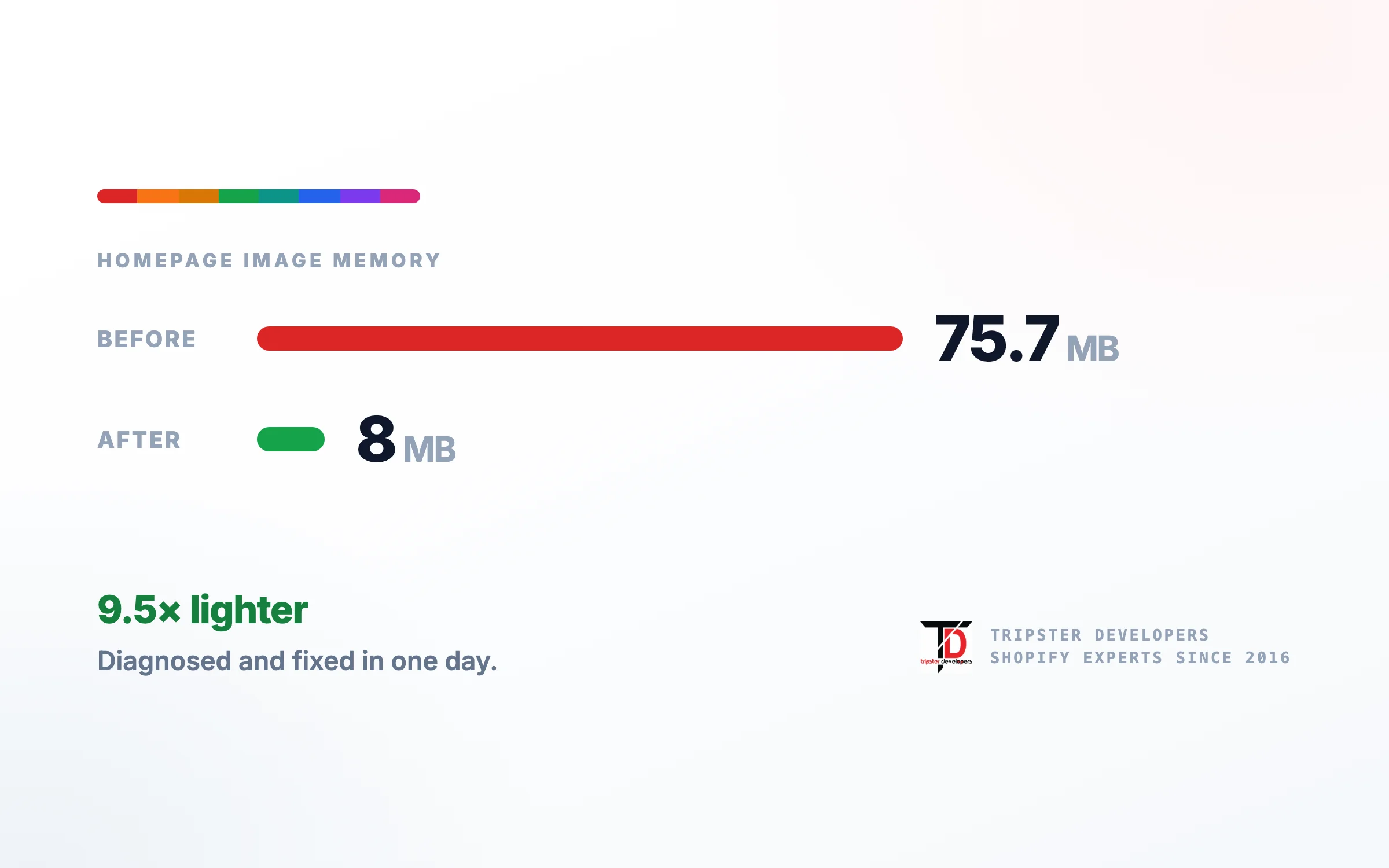
Capabilities proven here
Services behind this work Shopify theme development
The brief
If your Shopify store shows a blank screen inside the Facebook app but works in Chrome, the usual cause is not your link. It is memory.
The browser inside Facebook has far less to work with than a normal browser, and a page carrying too many full size images gets discarded mid render, leaving your site's background colour and nothing else.
Services & technology
- Performance diagnosis
- Image memory audit
- Native reviews section in Liquid
- Bulk image resizing
- Real-device testing
01How it was reported
“My Facebook links are broken.”
The owner called us. Almost every order her business takes begins with a post on her Facebook page, so when customers started telling her the link did not work, it went straight to her revenue.
What made it clear this was not a one off was that she had already started working around it in her own posts, telling people what to do if they could not reach the website. Nobody writes that line for a glitch they saw once. She had been losing orders to it for a while.
She sent a fifty second screen recording from her phone. That recording turned out to be the entire diagnosis.
02What the recording showed
Performance diagnosisShopify theme development
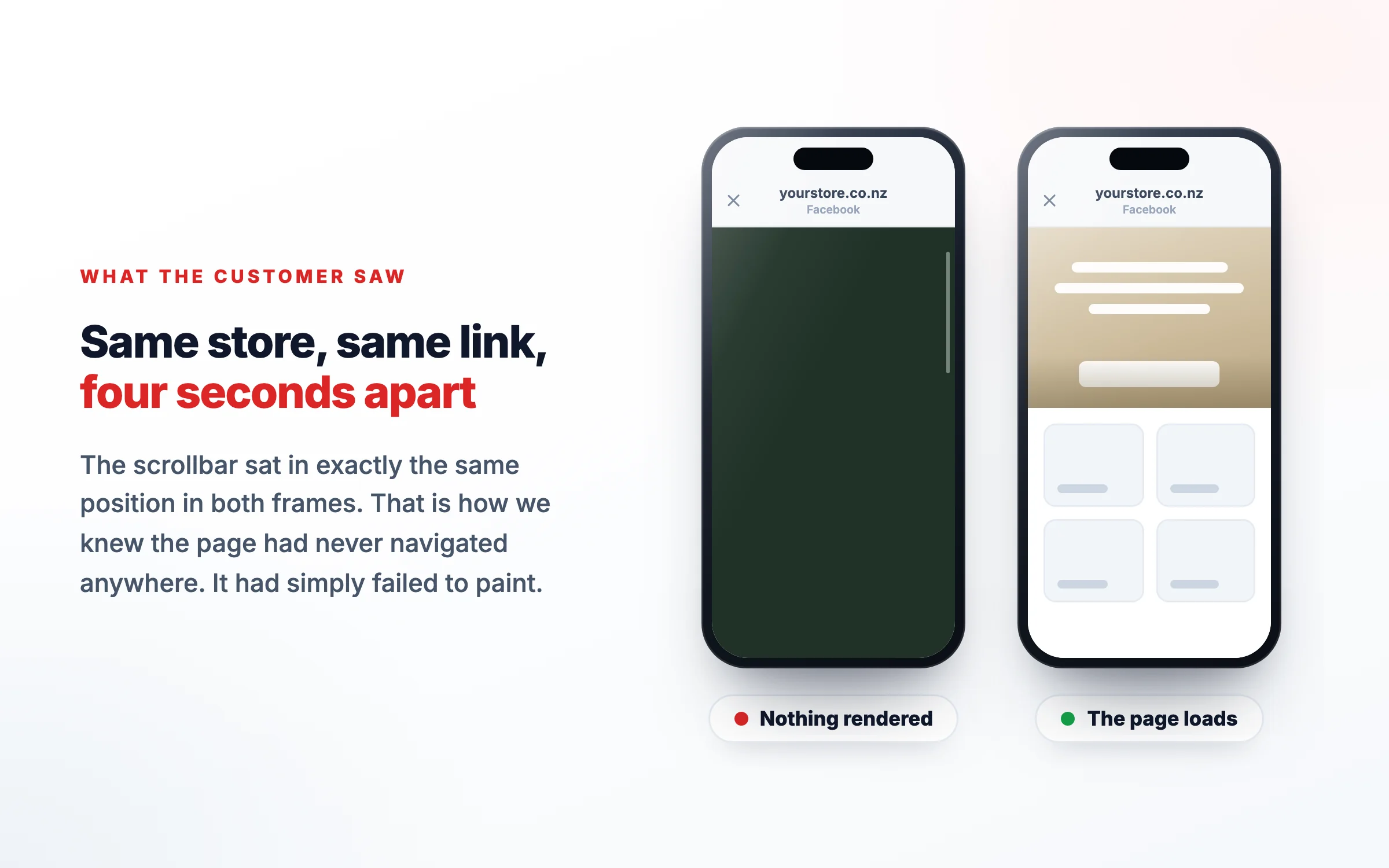
The link worked. The page died four seconds later.
Every version of the URL returned a healthy response, including the one carrying the tracking parameter Facebook appends to a real click. The page loaded. The hero image rendered. Then the whole screen turned flat dark green and stayed there until she gave up and closed it.
That dark green was her own website's background colour showing through with nothing painted on top of it. To a customer that is indistinguishable from a dead link, which is precisely why it was reported as one.
- 0.0 secondsLink tapped inside the Facebook appFacebook opens its own built-in browser rather than Safari or Chrome.
- 1.5 secondsThe page renders correctlyLogo, hero photograph, both buttons and the chat widget all appear. Nothing looks wrong.
- 4.0 secondsStill sitting idleThe frames here are byte for byte identical, so nobody was touching the screen. It was not a tap or a scroll.
- 4.1 secondsBlank, in a single frameSampled at fifteen frames per second there is no fade and no partial repaint. A popup animates in. A scroll shows intermediate content. This did neither.
Timeline reconstructed from the merchant's screen recording, frame by frame.
The detail that settled it was the scrollbar. It was pixel identical before and after: same position, same length. That means the same document at the same scroll offset, so the browser had not navigated anywhere. Nothing had been hidden and nothing had loaded in. The page had simply failed to paint.
03Why it happened
Image memory fixShopify theme development
A thumbnail was quietly loading a twelve megapixel photograph.
The homepage was holding 75.7 MB of decoded image data across 61 images. The rest of the store was nowhere near that.
Decoded image memory by page type. Only the homepage was ever over the line, and the Facebook link pointed straight at it.
The cause was a review app on the homepage. It rendered review thumbnails using raw image URLs with no size parameter, so instead of asking for a small version it pulled the full original every single time.
What was requested
4000 × 3000
959 KB downloaded
45.8 MB held in memory
To fill a thumbnail roughly 200 pixels wide.
What it needed
200 × 150
13.8 KB downloaded
0.16 MB held in memory
Identical on screen. 107 times lighter.
The same review thumbnail, requested two ways. Shopify resizes images on request, but only when the code asks for a size.
Underneath that sat the real hazard. 36 of the store's 82 product photographs were phone uploads at up to 24 megapixels. The theme resized them correctly, which is exactly why every other page was fine. The app did not.
Desktop Chrome and Safari have enough headroom to absorb that. The browser inside the Facebook app does not, because it runs inside an app already consuming a large share of the phone. When it runs out, the page is discarded and you are left looking at the background colour.
That is also why the fault looked random. It depended on how much memory each customer's phone had free at that moment, so it worked for some people and failed for many others.
Why a small thumbnail can cost a lot of memory
A browser decodes an image to width × height × 4 bytes, whatever its file size. Pick a photo width to see what one image costs to draw.
103.0 MB of memory to draw it
6000 × 4500 pixels × 4 bytes per pixel. The file on disk can be small; the phone still has to decode every pixel.
45.8 MB of memory to draw it
4000 × 3000 pixels × 4 bytes per pixel. The file on disk can be small; the phone still has to decode every pixel.
12.0 MB of memory to draw it
2048 × 1536 pixels × 4 bytes per pixel. The file on disk can be small; the phone still has to decode every pixel.
1.8 MB of memory to draw it
800 × 600 pixels × 4 bytes per pixel. The file on disk can be small; the phone still has to decode every pixel.
Worked arithmetic for a 4:3 photo, for illustration. The store’s own measured figures are in the results below.
04What we did
Native Liquid reviews sectionShopify theme development
Replaced the cause, then removed the hazard underneath it.
Everything was built on a duplicate of the live theme. The live store was never edited directly, and every original product image was copied locally with checksums before anything was touched.
- Rebuilt the homepage reviews nativelyRather than dropping her social proof, we wrote a section that reads the review app's own stored data and renders it in Liquid. Real reviews, star ratings, verified buyer labels, updating on their own as new reviews arrive. It renders no images and loads no JavaScript.
- Resized 36 oversized product photographsCapped at a sensible maximum dimension using our own bulk image tool, in a single reversible batch. The photographs are visually identical on the storefront because the theme was already displaying them far smaller than they were uploaded.
- Measured everything from outside the toolsEvery figure was taken by querying the store directly rather than trusting any tool's own progress report. A tool telling you it succeeded is not evidence that it did.
- Tested on a real phone, in the real appNot a simulator and not a desktop browser with a narrow window. The fault only ever appeared inside the Facebook in-app browser, so that is where it had to be signed off.
| Measure | Before | After |
|---|---|---|
| Homepage image memory | 75.7 MB | 8 MB |
| Images on the homepage | 61 | 21 |
| Largest single image | 45.8 MB | 0.8 MB |
| Across the whole catalog | 2,006 MB | 736 MB |
The product page reviews were left completely untouched, because they used a different component that was never part of the problem.
Results
A tenth of the weight, and nothing lost. Turnaround was one working day from getting store access.
- 75.7 → 8 MB
- Homepage image memory
- 61 → 21
- Images on the homepage
- 45.8 → 0.8 MB
- Largest single image
- 1 day
- From store access to live
- All 82 images across 48 products survived: none lost, no ordering changed, no alt text or variant links altered
- The reviews still update on their own
- Verified on a real handset through the Facebook app, from the post through to a product page
Measured on a mobile viewport with the Facebook in-app browser user agent, before and after publishing.
Check your own store
Four things worth looking at this week.
You do not need us to do any of this, and if it all comes back clean then you have lost ten minutes and gained some certainty.
- Open your store the way your customers do. Tap your own link from inside Facebook or Instagram, not from Chrome or Safari. Those in-app browsers are the least forgiving ones your customers use.
- Sit on the page without touching it for thirty seconds before you start scrolling. This particular failure happened while the screen was idle, which is easy to miss if you scroll immediately.
- Ask which page your social links point at. If every link goes to your homepage, and your homepage is your heaviest page, every visitor from social media is landing on your worst case.
- Check what size your product photographs actually are. If they came off a phone and went straight up, they are probably several times larger than anything your store ever displays.
Not sure whether your store has this problem? Send us your store URL. We will open it the way your customers do, measure what the page actually weighs, and tell you plainly whether there is anything worth fixing. If there is not, we will say so and you will owe us nothing.
Questions
Why does my Shopify store look blank in the Facebook app but work fine in Chrome?
Because the browser built into the Facebook app has far less memory to work with. It runs inside an app that is already using a large share of the phone, so a page that Chrome or Safari handles comfortably can exhaust what is left. When that happens the page is discarded and the screen falls back to your site's background color. Nothing is broken in your store or your link. The page simply could not finish rendering in that particular browser.
Is a blank page in the Facebook browser the same as a broken link?
No, although it is impossible to tell them apart as a customer, which is why it gets reported as a broken link. In the case on this page every version of the URL returned a healthy response, including the version with the tracking parameter Facebook adds to a real click. The link was never the problem. The page failed after it had already loaded.
Why does it work for some customers and not others?
Because it depends on how much memory each phone has free at that moment. Someone with a newer phone and few apps open gets through. Someone with an older phone, or with Facebook running for hours, does not. That is why merchants describe it as random, and why it is easy to dismiss when you test it once on your own phone and it works.
What is decoded image memory, and why does it matter more than file size?
File size is what gets downloaded. Decoded memory is what the image occupies once the browser expands it to draw it on screen, and it is far larger. A 4000 by 3000 photo might download as a one megabyte file but needs roughly 46 megabytes of memory to render. Page weight tools usually report the download, so a page can look reasonable on paper while being far too heavy in practice.
How much image memory is too much for a mobile page?
There is no official ceiling, but the contrast in this case is instructive. The homepage held 75.7 MB of decoded image data and failed inside the Facebook browser. The product pages held 6.3 MB and the collection pages 1.4 MB, and neither ever failed. If a page is many times heavier than the rest of your site, that page is the one to look at.
Can a Shopify app cause this even when my theme is fine?
Yes, and that is exactly what happened here. The theme was resizing images correctly everywhere it controlled them. A review app on the homepage was requesting images without a size parameter, so it pulled the full original every time to fill a small thumbnail. Apps render inside your pages but do not always follow the same rules your theme does.
My product photos come straight off my phone. Is that a problem?
On its own, usually not, because a well built theme requests a smaller version of whatever you upload. It becomes a problem the moment anything on your store requests the original instead. Modern phone cameras produce images up to 24 megapixels, and 36 of the 82 images in this store were in that range. Uploading at a sensible size removes the hazard rather than relying on every app to behave.
What size should product images be on a Shopify store?
For most stores a longest edge of about 2048 pixels is plenty. It is larger than any realistic display size including zoom on a high resolution screen, and it keeps the original small enough that nothing catastrophic happens if some app requests it in full. Going bigger adds storage and risk without adding anything a customer can see.
Does Shopify not resize images automatically?
Shopify can, and it does so whenever an image is requested with a width parameter. That is how themes normally serve images. The resizing is not automatic in the sense of being unavoidable, though. If code asks for the image URL without specifying a size, Shopify returns the original at full resolution, exactly as uploaded.
How do I check whether my own store has this problem?
Open your store on a phone through the app your customers actually arrive from, not through Chrome or Safari, and sit on the page for thirty seconds without touching it before scrolling. Then compare pages. If your homepage feels heavier than your product pages, or if it is the page all your social links point at, it deserves a proper look.
Will resizing my product photos make them look worse?
Not at a sensible size. In this project the photos are visually identical on the storefront because the theme was already displaying them far smaller than they were uploaded. What changed is how much data sits behind the same picture. We also kept a checksummed copy of every original before touching anything, so the change was reversible.
Does this affect the Instagram in-app browser too?
The same class of problem applies to any in-app browser, and Instagram is built by the same company on similar foundations. Any browser embedded in another app inherits that app's memory pressure. If most of your traffic arrives from social media, those browsers are the ones your site has to survive, and they are the least forgiving ones your customers use.
Does a heavy homepage hurt my Google rankings as well?
It can, because page experience is a ranking input and heavy pages score badly on it. That is the smaller problem here though. A page that ranks but does not render for a share of your visitors is losing orders directly, which costs more than a ranking position. Fix the rendering first, then treat the search benefit as a bonus.
Will I lose my product reviews if the review section is replaced?
No, and you should not accept a fix that costs you your social proof. In this project the product page reviews were untouched because they used a different component that was never part of the problem. On the homepage we built a section that reads the same review data the app already stores, so the reviews still update on their own, still show star ratings, and simply no longer pull product photographs.
Do I need to change my Facebook link after a fix like this?
Not once the page it points at is healthy. Before the fix, pointing the link at a lighter page was a sensible temporary measure that cost nothing and took a couple of minutes. It is worth knowing as a stopgap, because it puts something in your control while a proper fix is scheduled.
How long does a fix like this take?
This one was diagnosed, built, tested and published inside one working day from getting store access. Most of that time went on measurement and verification rather than writing code. The change itself was small, which is usually true once the actual cause is identified rather than guessed at.
What does work like this cost?
A focused performance fix on a single store is a small job, quoted at a fixed price before anything starts. Larger performance work across a full catalog, or a build that needs custom sections written from scratch, is scoped separately. We would rather tell you the cause is small and charge accordingly than sell a rebuild you do not need.
Related case studies
All work Beef & lamb boxesBurgess Peaks The whole store built end to end, connected to Facebook and Instagram, with homepage image memory cut from 75.7 MB to 8 MB.
 Essential oilsThe Good Oil Company A trust-first store that proves quality on every product page, with no app scripts on the homepage.
 Leather goodsKodiak Leather Rebuilt product pages and mobile checkout, and lifted the conversion rate by 85%.