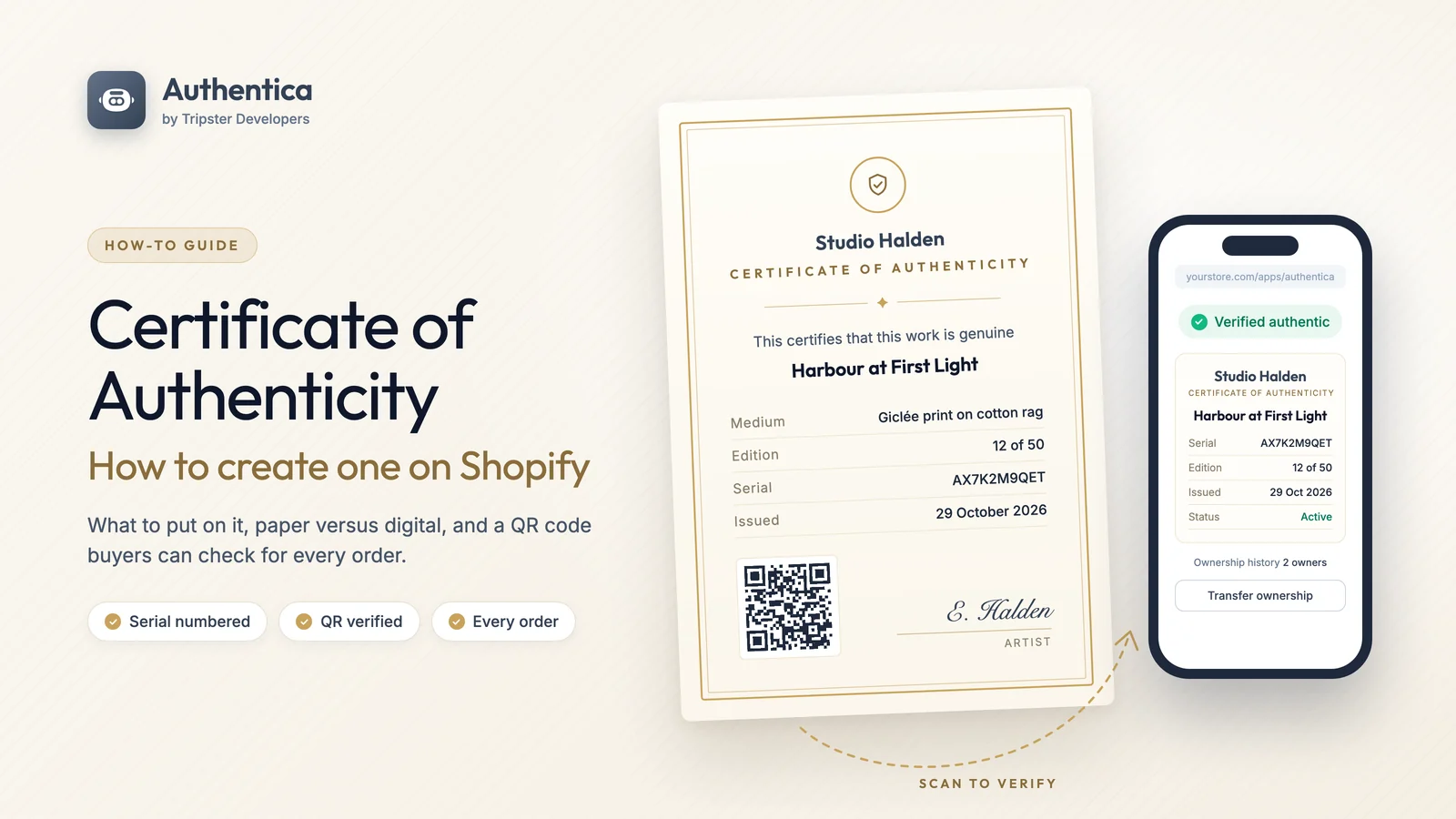
We build and run Authentica, a certificate of authenticity app for Shopify, so we see a lot of certificates: good ones, weak ones, and plenty of printed cards that say "100% genuine" and nothing else. Most of the advice below holds whatever tool you use, including a word processor and a pen. The Shopify section at the end shows how to take the manual work out of it.
What is a certificate of authenticity?
A certificate of authenticity (often shortened to COA) is a written statement, issued by the artist, maker or seller, that a specific item is genuine and is what the seller says it is. It ties a promise to one particular object: this print, this ring, this watch, this signed shirt.
It is worth being clear about what a COA is not. It is not a government document, and it is not the same as an independent appraisal or a lab report. A gemmological lab report grades a stone; an appraisal puts a value on a piece; a certificate of authenticity is the issuer standing behind the item. Its weight comes from three things: who issued it, how specifically it describes the item, and whether someone can check it later.
Buyers ask for one for practical reasons. It reassures them before an expensive purchase, it helps with insurance, and it matters when they come to sell. A watch or a limited print with its paperwork usually resells more easily than one without.
What should a certificate of authenticity include?
Every good certificate of authenticity, whatever the category, includes the same core details:
- The issuer. Your business or studio name, logo, website and a contact email, so a future owner knows who to ask.
- A clear title. "Certificate of Authenticity" at the top, so nobody mistakes it for a receipt or a care card.
- The item. A name and a description specific enough that the certificate could only belong to this piece.
- A unique serial or certificate number. This is the single most important line. It is what links the paper to a record you keep.
- Category details. Medium and dimensions, metal and stones, reference numbers, edition number: whatever a buyer in that category expects (see below).
- The date. When it was made, sold or certified.
- A statement of authenticity. One plain sentence, such as "This certifies that the item described is a genuine, original work by...".
- A signature. From the artist, maker or an authorised person at the business, with their name or role printed underneath.
- A way to verify it. A QR code or web address where anyone can check the certificate against your records. Without this, a COA is only as good as the paper it is printed on.
Then add the details that matter for what you sell.
Certificate of authenticity for art
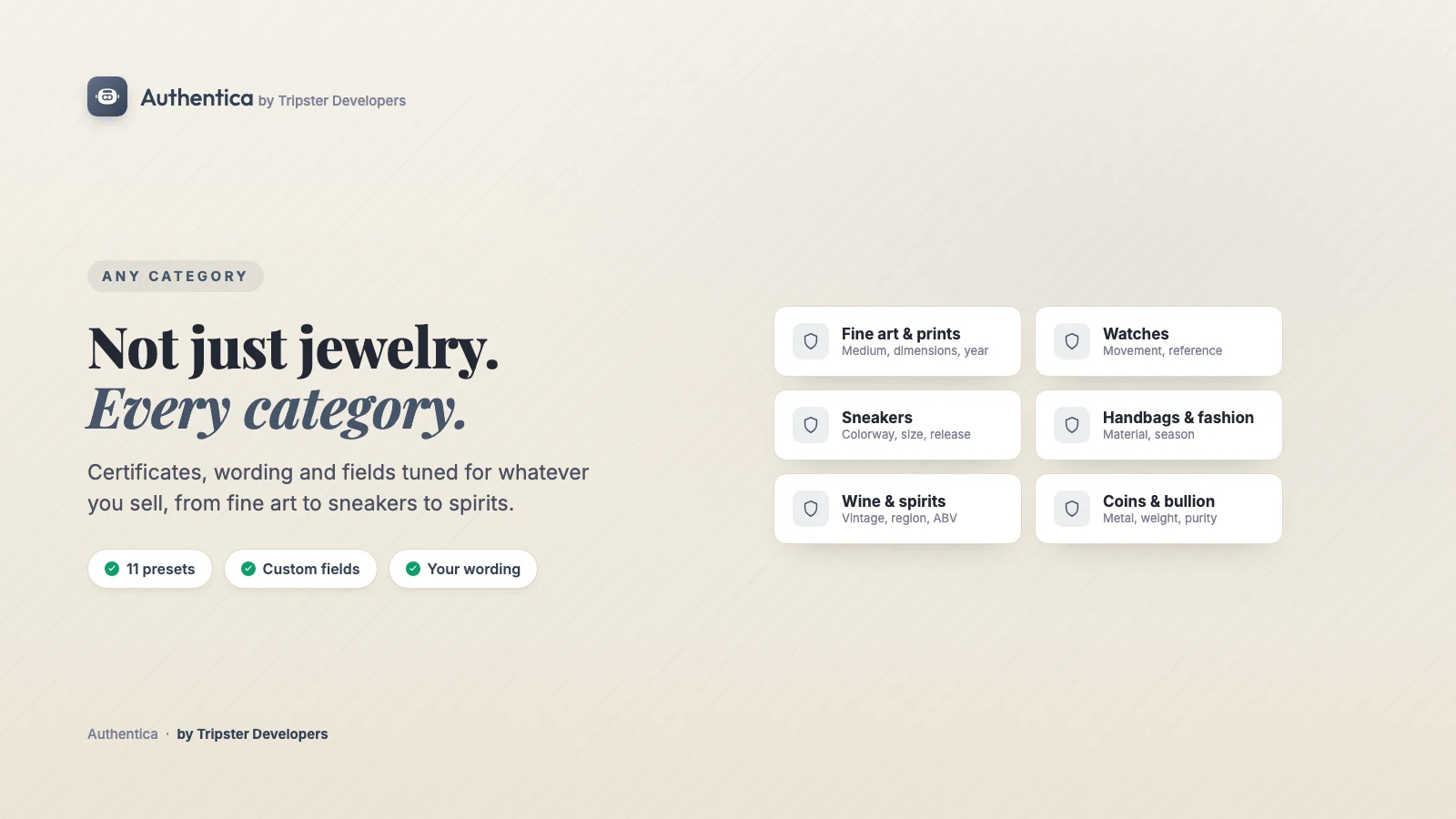
For original artworks and prints, include the artist's name, the title of the work, the year it was made, the medium (oil on canvas, giclée print on cotton rag, bronze), the dimensions, and for prints the edition number and edition size, such as 12 of 50. Collectors also value a short provenance note (where the work has been, any exhibitions) and the artist's signature. If you produce a numbered edition, never reuse a number, even when a print is returned.
Certificate of authenticity for jewelry
Describe the piece and what it is made of: the metal and its purity (18k yellow gold, sterling silver 925), the total weight, any hallmark, and for each stone its type, carat weight, cut and, where you have them, colour and clarity grades. If a diamond or gemstone has been graded by an independent gemmological lab, quote the lab and the report number on your certificate. Your COA then confirms the piece is yours; the lab report confirms the stone.
Watches
Watch buyers look for the brand, model, reference number, case or movement serial number, movement type, year of production, and what is included (box, papers, extra links). For pre-owned pieces, note the condition and any service history. The reference and serial numbers matter most, because they are what a buyer will check against the watch itself.
Sneakers, trading cards and collectibles
For sneakers and streetwear, include the model, the style code, size, colourway and release date. For trading cards and memorabilia, record the set, card number, any grading company and grade, and for signed items, who signed it and when. Limited drops benefit from edition numbering in the same way prints do.
A certificate of authenticity template that works
Most people searching for a certificate of authenticity template want a layout they can fill in. Whatever tool you use, the layouts that hold up share the same structure, top to bottom:
- Header: your logo or studio name, then "Certificate of Authenticity".
- Statement: one sentence certifying the item is genuine, with the item's name set larger than the rest.
- Detail lines: a short label and value table (Medium, Edition, Serial, Date) rather than a paragraph, so it is easy to read and easy to check.
- Footer: the QR code or verification address on one side and the signature on the other, with a seal if you use one.
Keep it to one page, leave white space, use your brand colours and one or two typefaces, and print it on good paper if it goes in the box. The design should look like it belongs to your brand, because a generic template tells the buyer very little about who stands behind it.
Paper vs digital certificates of authenticity
There are four common ways to issue a certificate today. Each has a place, and many stores combine two of them.
| Approach | What the buyer gets | Strengths | Watch out for |
|---|---|---|---|
| Printed card | A paper certificate in the box | Feels premium, no technology needed | Easy to copy, easy to lose, nothing to check it against |
| Hologram sticker or tag | A label on the item or packaging | Visible at a glance | Generic holograms can be bought by anyone |
| Digital certificate with QR verification | A certificate plus a page they can check online | Unique serial, checkable by anyone, can follow the item to a new owner | Needs a record kept online by the issuer |
| Blockchain or NFT certificate | A token linked to the item | A public ledger record | Buyers may need a crypto wallet; often a fee per certificate |
For most small and mid-sized brands, the practical answer is a digital certificate with QR verification, plus a printed copy in the box for the moment of unboxing. The printed copy gives the feel; the QR code gives the proof.
Is a digital certificate of authenticity valid?
Yes. A digital certificate of authenticity carries the same meaning as a paper one: it is the issuer's statement that the item is genuine. A digital certificate is often the stronger of the two, because a buyer can check it on the issuer's own website at any time, and the issuer can show it as revoked if the sale is reversed. A paper card cannot do either.
How buyers verify a certificate of authenticity
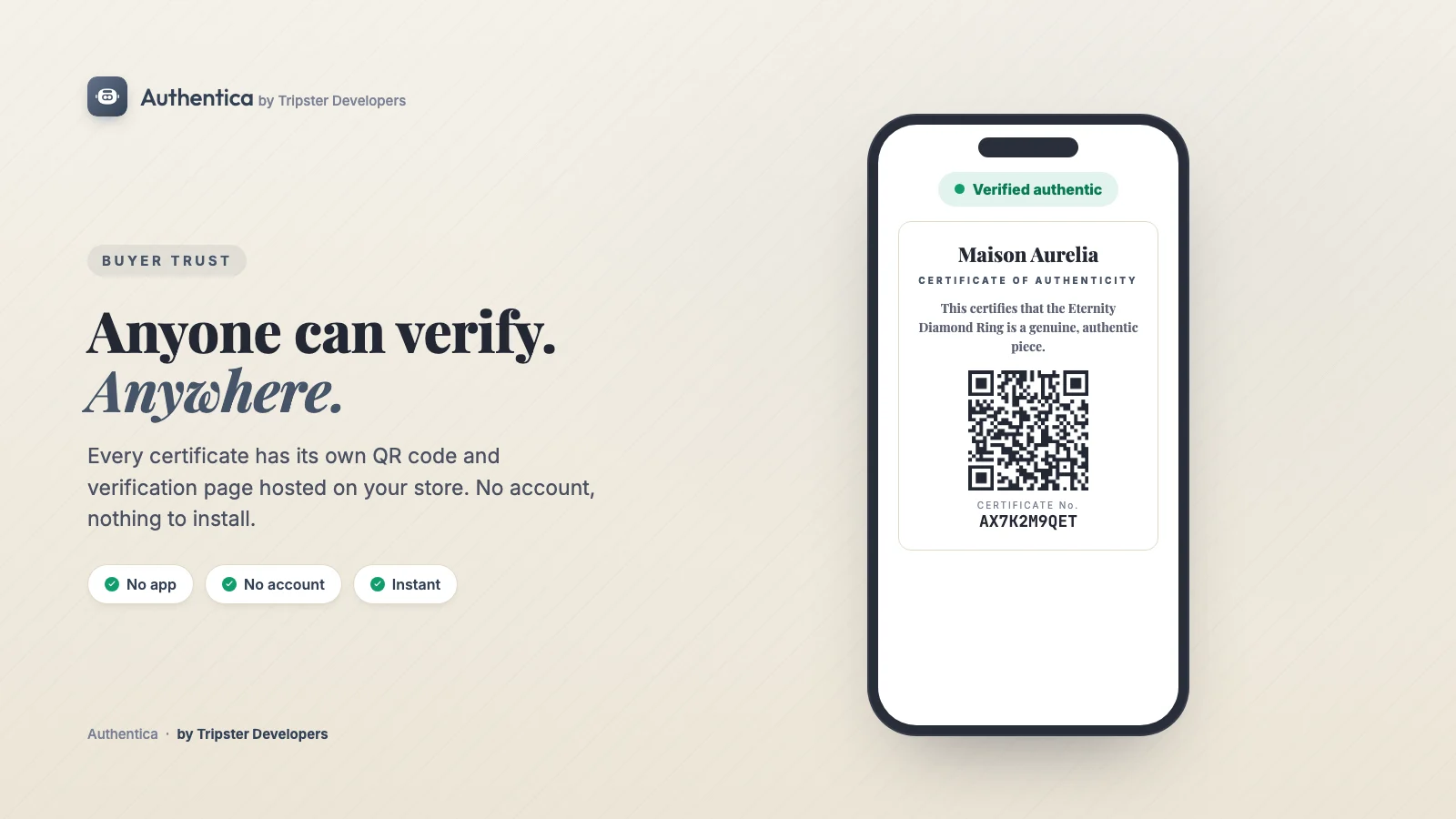
A certificate is only useful if a buyer can check it. With a QR-based certificate the process is short:
- Scan the QR code on the certificate, label or packing slip with a phone camera.
- Check the address. The page should open on the seller's own website, not an unrelated domain.
- Match the details. The serial number, item description and edition number on the page should match the certificate and the item.
- Check the status. A genuine certificate shows as valid. If it shows as revoked, or the serial is not found, contact the seller.
How to create a certificate of authenticity on Shopify
Shopify has no built-in certificate of authenticity feature. You can design certificates by hand and slip them into each parcel, but that falls apart as orders grow: serial numbers get duplicated, refunds leave valid-looking certificates in circulation, and nobody can check anything online. An app solves the record-keeping. Here is how it works with Authentica: COA Certificates, the app we built for this.
- Install Authentica from the Shopify App Store. The free plan covers 50 certificates a month, and a sample certificate is ready the moment you open the app, so you can see and share a real one before your first order.
- Pick your category. In the designer, choose a preset (fine art and prints, jewelry, watches, luxury fashion, sneakers, collectibles and trading cards, autographs, wine and spirits, coins and bullion, handmade goods, or General). It fills in suggested wording and detail fields for what you sell.
- Design the certificate. Start from the Classic, Modern, Minimal or Ornate layout, then drag elements anywhere on the canvas. Add your logo, a seal, your colours and fonts, and choose a paper size (A4, US Letter, A5, A6 or square) for a print-ready copy. Detail lines can pull values from product and variant metafields, so carat weight or medium fills itself in.
- Choose when certificates go out. By default, every paid order issues a certificate automatically, one per item with its own serial number and QR code, and emails it to the buyer. You can switch the trigger to fulfilment instead, certify only products with a chosen tag, and keep add-ons such as engraving, resizing or gift wrap out of your registry.
- Set up numbered editions if you sell limited runs, so each certificate carries its number, such as 12 of 100, and each edition keeps its size once it starts. The editions guide covers serial formats and edition sizes, and the edition register guide covers pre-issuing every piece.
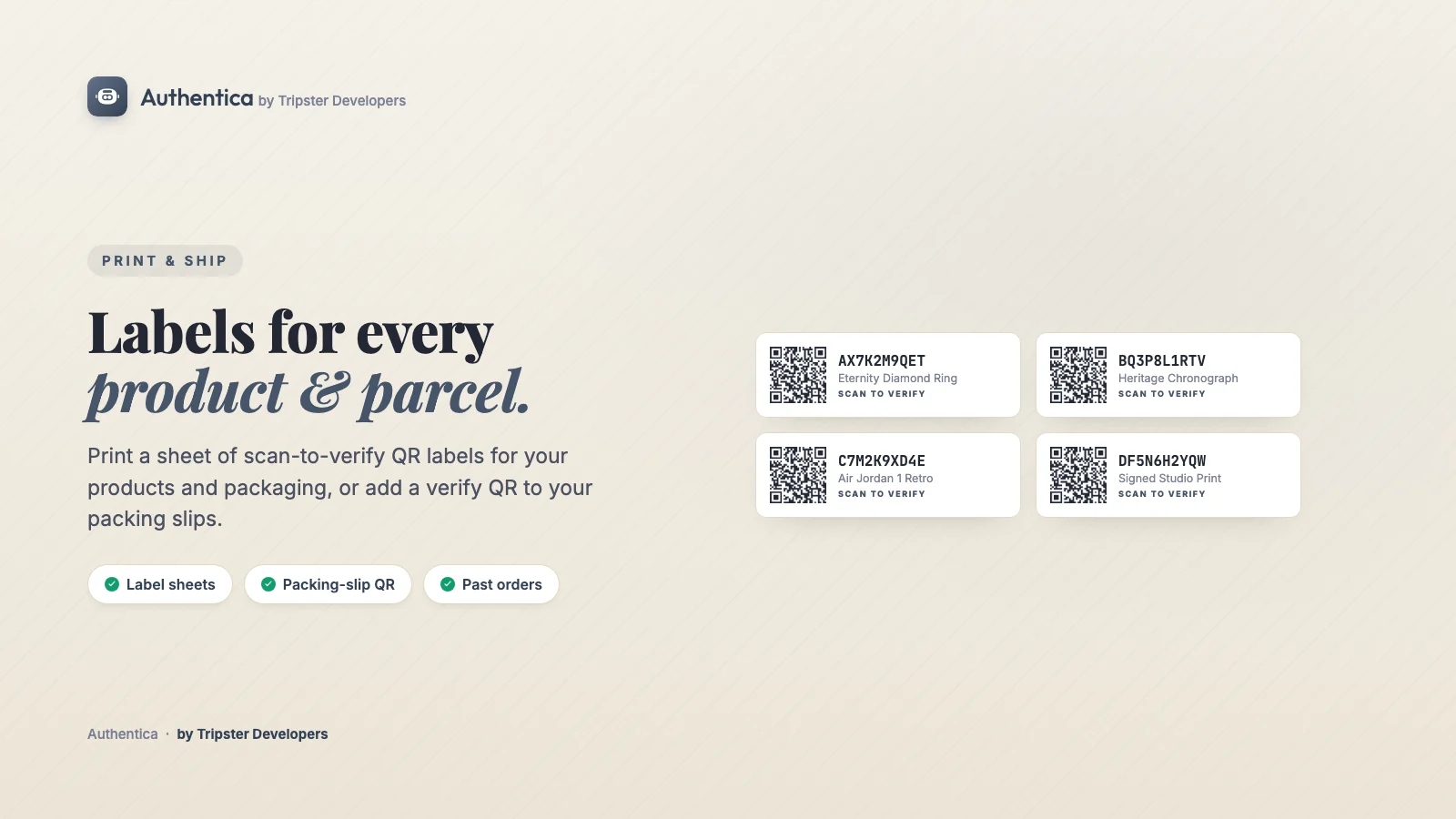
- Put the QR code in the box. Print QR labels for products and packaging, or add a scan-to-verify QR code to your packing slips, on any plan. Starter adds print-ready SVG and PNG QR files for your print shop.
- Certify past orders if you have been trading for a while. Back-catalogue issuance certifies earlier paid orders in bulk, so existing customers get certificates too. Certificates you already issued elsewhere can come in by CSV import.
From then on there is nothing to do per order. Each buyer, or anyone who owns the item later, scans the QR code and lands on a verification page on your own store. There is no account to create, no app to install and no wallet to connect.
What happens after the sale
The part paper certificates cannot handle is everything that happens after the buyer receives the item. Authentica keeps the certificate in step with the real world:
- Resale and gifts. Ownership transfer moves the certificate to its new owner, while a provenance trail keeps every previous owner on record. You decide who can transfer, and you can hide owner names on the public page.
- Refunds. A refunded or cancelled order revokes its certificates automatically, and the verification page shows them as revoked, so a returned item cannot be resold with a certificate that still looks valid. You can change this if your returns policy works differently.
- Tampering. Every certificate is cryptographically signed with a tamper-evident fingerprint, without any blockchain, NFT or wallet involved.
- Your other tools. On every plan, including Free, certificate events go to Klaviyo and your own webhooks (and from there to Zapier or Make), and Shopify Flow triggers fire when a certificate is issued, first verified, transferred or reported. Our list of Shopify Flow automation ideas has more on what Flow can do with events like these.
The app works for any store where a buyer might ask "is this real?": jewelry, art, watches, sneakers and collectibles, as well as luxury fashion, wine and spirits, coins and handmade goods. You can read the full feature list on the Authentica product page, and the story of why we built it without a blockchain in our Authentica launch post.
Everything Authentica does: the full feature list
If you are comparing certificate of authenticity apps for Shopify, this is the complete list of what Authentica does today, grouped by job, with the plan each feature sits on. "All plans" includes the free plan. Starter adds register tools and removes our branding; Pro adds white-label and developer features.
Issuing certificates
- Automatic issuing on every order. One serial-numbered certificate and QR code per unit, issued when the order is paid or, if you prefer, when it is fulfilled. All plans
- Choose what gets certified. Certify only products with a specific tag, keep add-ons such as resizing, engraving, gift wrap or digital items out, or skip anything that is not shipped. All plans
- Issue by hand, using your own field labels, with an optional expiry per certificate. All plans
- Past orders in bulk. Search your whole order history and certify earlier orders in one run. All plans
- CSV import for certificates you issued before Authentica, uploaded as a file or pasted as rows. All plans
- A sample certificate from day one, so you can see and share a real one before your first sale. All plans
- Serial formats: sequential (00001), Roman numerals or a date prefix. All plans
- Numbered editions such as 001/999. Each product's edition keeps the size it started with, and numbers are never reused by accident. All plans
- An edition register. Pre-issue every piece of an edition by hand or by CSV All plans, then give each new order a pre-issued piece and replace a lost certificate without losing its history Starter.
- Certificate validity. Optional expiry for warranties, memberships or limited-validity items; the page then shows the certificate as expired. All plans
- Revoke on refund: all pieces, only the refunded pieces, or never, with cancelled orders handled the same way. All plans
- Activation checks. Hold new pieces as "Not activated" until your own checklist (up to 12 checks, such as item inspected or card matches) is ticked. Pro
Design and branding
- A drag-and-drop designer with your logo, colours, custom fields, wording and a full font library, plus 11 category presets from fine art and watches to wine and spirits and coins and bullion. All plans
- Hide owner names on public pages (buyer emails are never public). All plans
- Remove Authentica branding from the certificate and emails. Starter
- Your own public wording: a status line and note above a valid certificate, and the option to show the edition number (such as 042/150) in place of the serial. Starter
- A white-label verification page with no Authentica branding anywhere. Pro
Verification and trust
- QR verification with no account, no app and no wallet, years after the sale, showing a clear "Verified authentic" state. All plans
- Cryptographic signing, so a forged or altered certificate fails the check. All plans
- Digital Product Passport ready. Every verification page carries machine-readable product and provenance data, each certificate has its own passport record, and an item with a GTIN (barcode) gets a GS1 Digital Link, the standard the EU Digital Product Passport rules are built on. No blockchain needed. All plans
- Verification links on your store (/apps/authentica), or on Authentica's secure domain for password-protected stores and sites outside Shopify. All plans
- Certificate pages on your own domain, such as a verify subdomain of your website. Pro
- Lookup by edition and piece number for printed cards without a QR code: the buyer picks the edition, types the piece number and lands on that piece's current certificate. Starter
- Problem reports. A buyer can report a problem from the verification page, and it reaches you as an event. All plans
- 15 languages on the verification page, picked from the buyer's browser, including right-to-left Arabic, with the certificate date and the buyer email in that language too. The admin itself runs in 12 languages. All plans
- A "Verified Authentic" storefront badge on product pages. All plans
- NFC tags. Write a certificate's link to an NFC tag from Android Chrome, or copy the link for any NFC writer. All plans
Ownership and provenance
- Ownership transfer on resale or gifting, with the full provenance chain kept underneath. Transfers can work for anyone with the private link, or only through you. All plans
- Verified transfers: the current owner confirms by email, the new owner accepts by email, and you can approve each one. Pro
Fulfilment, channels and buyers
- The certificate emailed to the buyer, with your own wording and reply-to address. All plans
- QR labels and packing slips: a printable label sheet and a scan-to-verify QR on packing slips. All plans Register extras on labels Starter.
- Print-ready QR files: SVG vector or 1200 px PNG for each certificate, or every active QR code in one ZIP. Starter
- Shopify POS. In-person POS sales auto-certify like any other order, and staff can look a certificate up by serial number in the Authentica admin. All plans
- Customer accounts. A "My certificates" page and a certificate block on each order in Shopify's new customer accounts. All plans
Data, integrations and developers
- Insights. Verification analytics: how often certificates are scanned, which items get checked most, and certificates flagged for possible QR cloning. All plans
- Shopify Sidekick. Ask Sidekick to find certificates and report your certificate metrics. All plans
- Klaviyo events and webhooks for certificate issued, first verified, ownership transferred and problem reported, to Zapier, Make or your own backend. All plans
- Shopify Flow triggers for the same four events. All plans
- CSV exports of certificates, ownership history and the change log. All plans
- Private photos per piece (dispatch, return, complaint), never public, with a ZIP export. Pro
- Full JSON export with history, and a Developer API to show certificates on WordPress or a headless store. Pro
The plans and limits page in the Authentica docs keeps the same breakdown, and the in-app What's new page lists each change as it ships.
Pricing
- Free: 50 certificates a month, the full designer with your branding and custom fields, auto-issue on every paid order, the certificate emailed to the buyer, QR verification and storefront badge, numbered editions, ownership transfer, past orders and CSV import, QR labels and packing slips, NFC, POS auto-certify, customer accounts, Insights, Sidekick, Klaviyo, webhooks and Shopify Flow triggers, and verification pages in 15 languages
- Starter, $7.99 a month ($86.29 a year): 500 certificates, Authentica branding removed from the certificate and emails, edition register tools (pre-issued pieces assigned to orders, replacement certificates, lookup by edition and piece number), your own public wording, and print-ready SVG and PNG QR files
- Pro, $19.99 a month ($215.89 a year): 5,000 certificates, a white-label verification page, certificate pages on your own domain, verified transfers, activation checks, private photos, full JSON export, the Developer API and priority support
If your store needs something more custom, such as certificates issued from a marketplace or ERP, our Shopify app development team builds that kind of integration. For the product pages the certificate supports, our Shopify product page SEO checklist is a good next read.
Frequently asked questions
What should a certificate of authenticity include?
At minimum: who issued it and how to contact them, a clear description of the item, a unique serial or certificate number, the date of sale or issue, a statement that the item is genuine, and a signature. Add the details that matter for the category, such as medium, dimensions and edition number for art, metal and stone details for jewelry, or reference and serial numbers for watches, plus a way for a buyer to check the certificate later, such as a QR code that opens a verification page.
Is a digital certificate of authenticity valid?
Yes. A certificate of authenticity is a written statement from the seller or creator, and nothing makes a paper version more official than a digital one. What gives either version weight is who issued it, how specific it is, and whether a buyer can check it. A digital certificate with a unique serial and a verification page on the seller's own website is easier to check, and harder to copy convincingly, than a printed card alone.
How do I make a certificate of authenticity for art?
List the artist, the title, the year, the medium, the dimensions and, for prints, the edition number and edition size (for example 12 of 50). Add a short provenance note, sign it, and give it a unique serial number. If you sell on Shopify, an app such as Authentica can issue a numbered certificate with a QR verification page automatically when each print or original is paid for.
How do I create a certificate of authenticity for jewelry?
Describe the piece and its materials: the metal and its purity, the total weight, and for each gemstone its type, carat weight and any grading details. If a stone has a report from an independent gemmological lab, quote the report number. Then add your business details, the date, a unique serial number and a signature, so the certificate matches one specific piece and nothing else.
Is there a free certificate of authenticity template for Shopify?
Authentica has a free plan that covers 50 certificates a month and includes the full drag-and-drop designer, with Classic, Modern, Minimal and Ornate starting layouts and category presets that fill in suggested wording and fields for what you sell. Each certificate is issued with its own serial number and QR code when an order is paid.
Can a certificate of authenticity be faked?
A printed certificate on its own can be copied with a scanner and a printer. That is why a certificate should carry a unique serial number and point the buyer to a record they can check on the seller's own website. If the serial and the online record do not match, or the certificate shows as revoked, the buyer knows something is wrong.
Can a certificate of authenticity expire?
Most certificates of authenticity never expire, because the item stays genuine for as long as it exists. An expiry date makes sense when the certificate also stands for something time-limited, such as a warranty, a membership or a service period. In Authentica, expiry is optional and can be set per certificate; once the date passes, the verification page shows the certificate as expired instead of valid.
Can I add an NFC tag to a certificate of authenticity?
Yes. An NFC tag stitched into a garment, set under a frame or attached to the packaging can hold the same verification link as the QR code, so a buyer taps the tag with a phone instead of scanning. Authentica writes a certificate's link to an NFC tag straight from the certificate page in Android Chrome, or lets you copy the link for any other NFC writing app, on every plan.
Give every order a certificate buyers can check
A good certificate of authenticity is specific, numbered, signed and checkable. On Shopify, Authentica handles all four for every paid order, starting on the free plan. Install Authentica free from the Shopify App Store, or talk to our team if you would like help setting it up.